Before you begin
- Tecovas uses a custom bootrunner extension inside Shopify POS to request backroom sizes and styles.
- Standard Shopify POS already provides product search, variant details and inventory information.
- The backroom request workflow is Tecovas' custom implementation, with no public installation link in the coverage.
- The screenshots show Shopify documentation examples, not Tecovas' bootrunner interface.
What problem was Tecovas solving?
A boot fitting can mean trying another size or comparing a different style. Someone has to find the next pair while the customer waits.
Boot retailer Tecovas uses a custom extension inside Shopify POS, Shopify's point-of-sale app, to help with that handoff. In an October 20, 2026 feature, Shopify describes its bootrunner extension as a way for associates to call up sizes and styles from the backroom while staying with the customer.
That fits the service approach described by Tecovas Chief Retail Officer Kim Heidt in Shopify's October 2025 interview. She wants operational tools to be intuitive so staff can spend more of their training time learning the products.
What does bootrunner add?
Shopify describes a focused backroom request workflow. An associate can call up a size or style through the POS extension instead of leaving the customer or using a radio.
The basic sequence below illustrates that description. The linked coverage does not document the actual buttons, request queue or backroom screens.
Identify the next pair
The associate and customer work out which size or style to try next.
Request it through the extension
The associate uses the custom workflow in Shopify POS to call up the pair from the backroom.
Keep the fitting conversation going
The purpose is to let the associate stay with the customer while the backroom supplies the requested boots.
Can another store install Tecovas' app?
Shopify describes bootrunner as Tecovas' custom extension. The linked coverage does not provide a public app listing or an installation guide. A similar workflow would need a suitable existing app or a development project scoped to your store.
Start with the stock information already in POS
Shopify POS already lets staff search for a product, open its variants, such as sizes or colors, and check inventory. That is the starting point for finding the size a customer wants.
Products need to be available to the Point of Sale sales channel to appear in POS. Before looking for another app, check that the products and variants staff need are available there and that the inventory information is accurate.
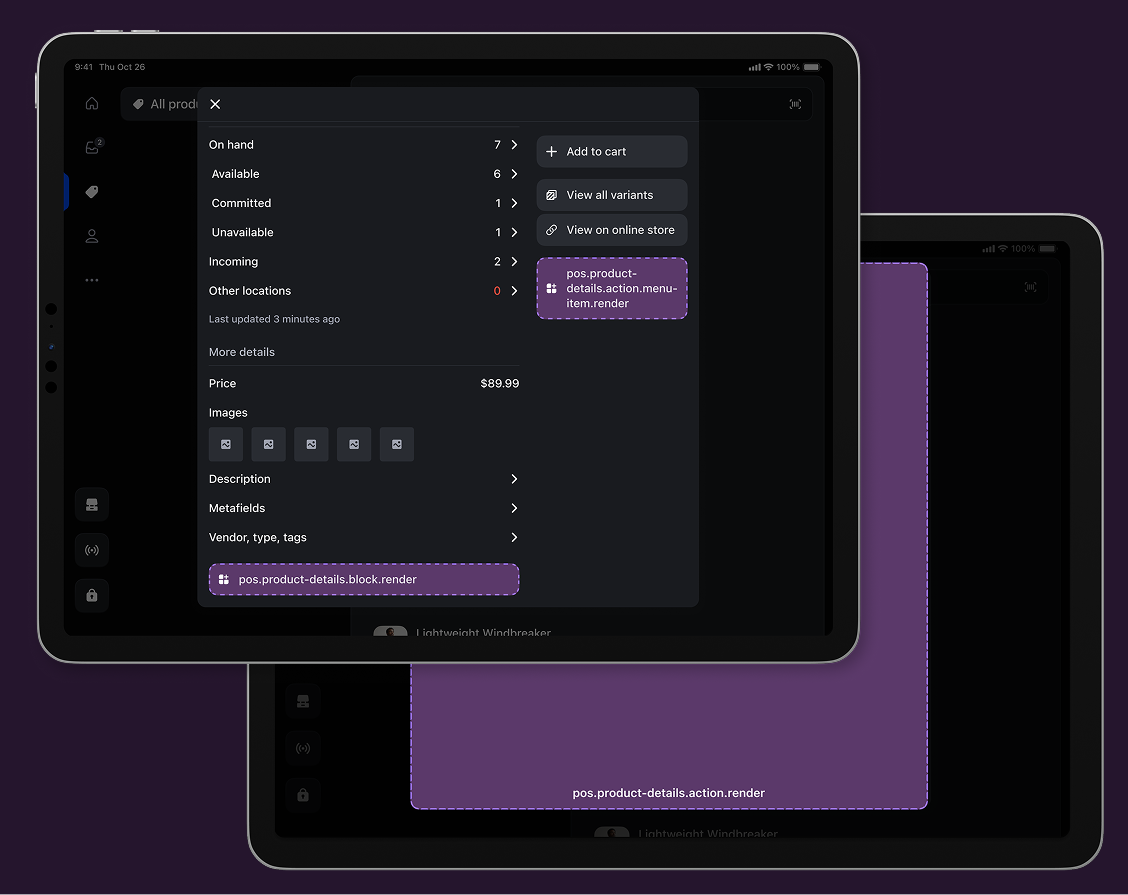
In the documentation image below, the product details screen shows stock quantities and other-location inventory. The purple areas mark places where developers can add custom app controls.
How does a custom app fit inside POS?
Shopify lets developers add features inside its POS interface using UI extensions. For a store associate, that can mean an app tile on the home screen, an extra action on a product, or a panel of information beside existing controls.
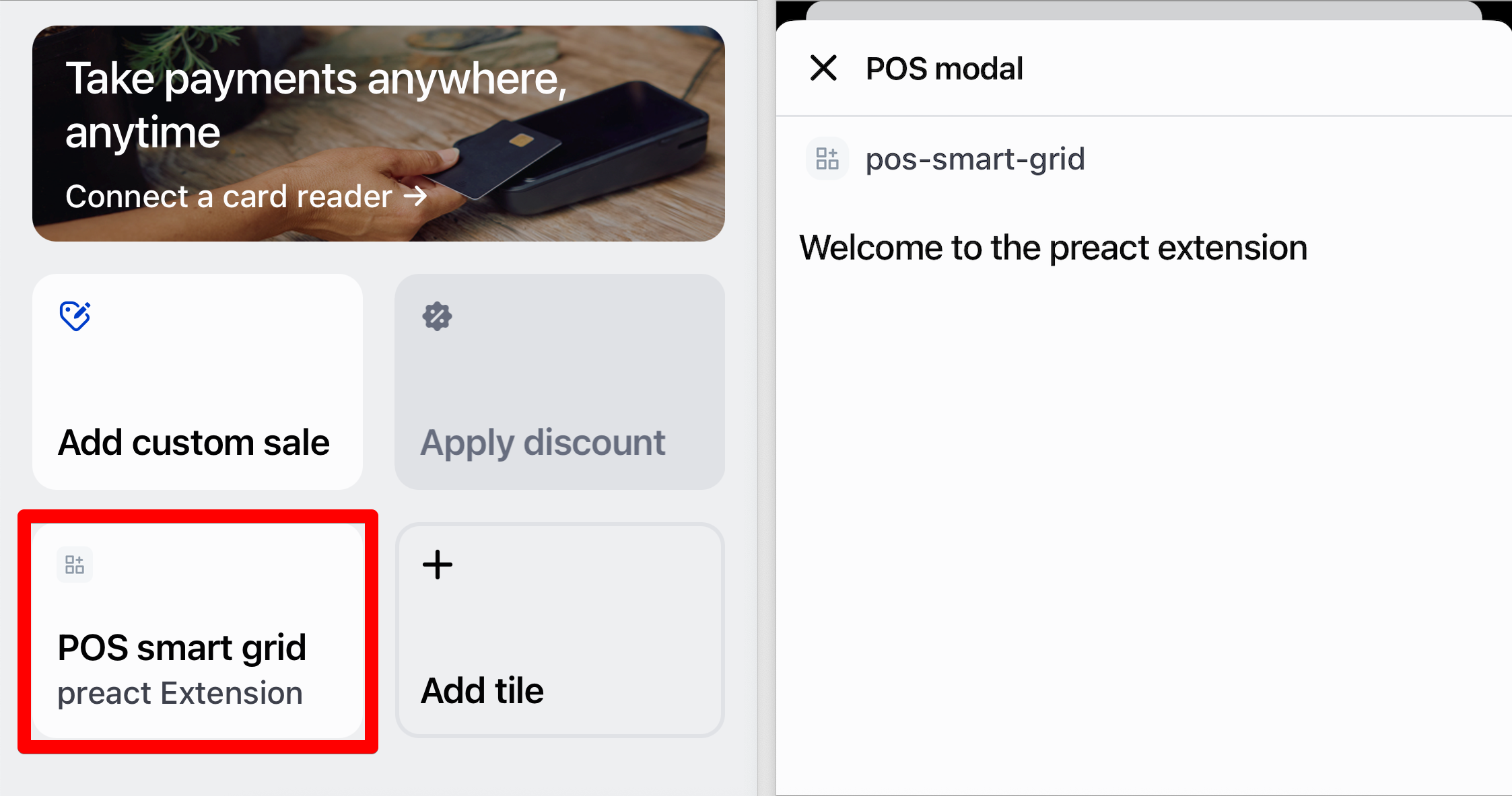
An app tile can open a screen for a particular task. The tutorial example below shows that entry point and the screen it opens. A developer would still need to build the useful workflow and connect any systems it depends on.
These are ways Shopify supports custom apps generally. The sources do not establish which screens or technical design Tecovas uses for bootrunner.
What to check before copying the idea
| Task | Where to start |
|---|---|
| Find a product or size | Use the product and variant search already in Shopify POS. |
| Check available stock | Review the inventory information and location data in POS. |
| Request a pair from the backroom | Look for an app or a custom workflow that handles the handoff your team needs. |
| Run exchanges or save carts | Check the POS Pro feature requirements before adding another app. |
| Give staff access | Confirm the login, app access and permissions needed on the devices and locations that will use it. |
Write down the task your team needs help with. Finding stock, requesting a pair and completing an exchange are different jobs, with different requirements.
Basic in-person selling features come with paid Shopify plans. Some workflows, including exchanges, saved carts and ship-to-home, require POS Pro. App compatibility and staff access also need checking for the features you choose.
A small test for a footwear store
I'd start by watching one fitting session and noting where the handoff slows down. Is the associate searching for the right variant, waiting for an answer from the backroom, or looking for someone to collect the pair?
Then try a small change to that task and record what happens. A useful test could track:
- The time from requesting a pair to bringing it to the customer.
- How often the wrong size or style is supplied.
- Requests that need to be repeated or followed up.
- Whether the associate can stay with the customer during the handoff.
Sources and scope
This article uses Shopify's October 20, 2026 newsroom feature, its October 30, 2025 Kim Heidt interview, and official POS documentation checked October 27, 2026. The recent feature describes an existing custom implementation; it does not announce a public app release. We haven't used bootrunner, observed a Tecovas fitting or measured its results. The screenshots are Shopify documentation and tutorial examples, not captures of Tecovas' app.