Before you begin
- Canvas lets eligible stores create and change a theme through Sidekick.
- It's still in early access, and third-party themes aren't supported.
- You can't add or configure app blocks or app embeds inside Canvas.
- Review the design and buying experience before publishing it.
Yes, you can describe the storefront you want
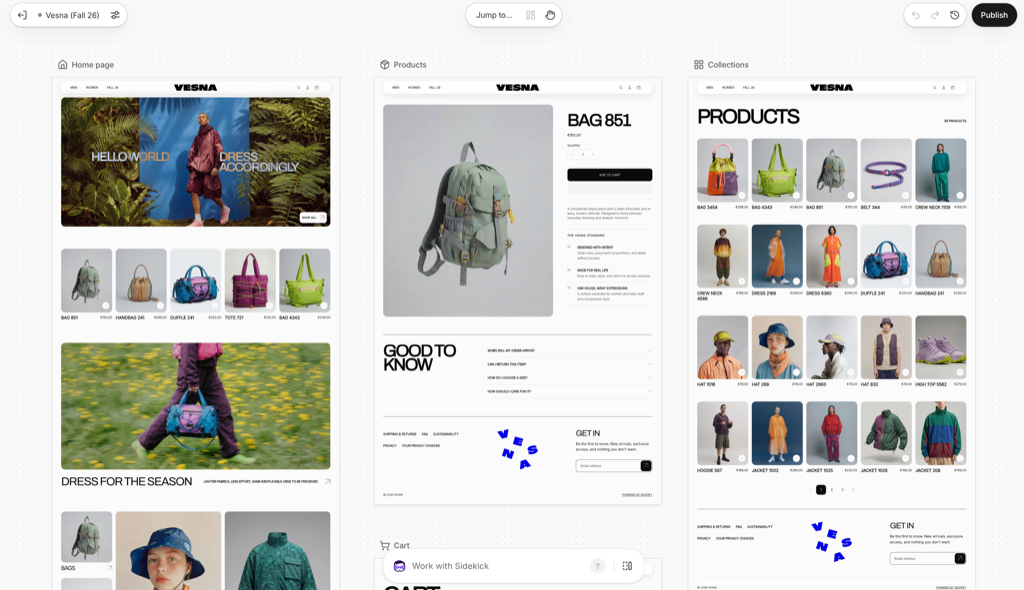
If your store has access to Shopify Canvas, you can describe a storefront and have Sidekick build its theme. You can then ask for changes as you look at the result.
Canvas is the workspace where you see the design. Sidekick is the AI assistant doing the work. You can view templates together, open a page to work on it, and make some edits directly in the preview.
Shopify introduced Canvas on October 1, 2026. Its launch announcement describes Sidekick editing theme files and checking screenshots as it builds. The changes can range from a single section to a store-wide redesign.
Talking can be literal, too. Shopify documents a Sidekick voice mode on screens where the assistant is available. Canvas itself is desktop-only; a conversation on your phone isn't the same as opening its design workspace.
Give Sidekick something specific to work with
I'd start with what the customer needs to understand on the page. A request such as "make it better" leaves most of the decisions unstated. Describe what you sell, the feel you're after, and the information someone needs before buying.
These are example prompts to adapt, not results from a Canvas test.
Describe the brand and product page
Use it to turn a rough idea into a design you can review.
"Build a storefront for a small skincare brand. Use a cream background and large product photos. On the product page, keep the ingredients near the product description and make the size options easy to find."
Look at what it produces before adding more instructions. Check whether the page explains the product clearly and whether the design still works with your actual images and longer product names.
Ask for one change you can judge
Use it to check the size-guide placement before changing the rest of the template.
"On the product template, move the size guide closer to the size selector. Keep the existing type and colors. Show me the page at a phone width before changing anything else."
A focused request makes the result easier to assess. If several unrelated things change together, it's harder to decide which part to keep.
Check the theme and app restrictions first
| What to check | Current position |
|---|---|
| Theme source | Shopify-developed and custom themes are supported. Third-party themes are not. |
| Editing later | A theme created or edited in Canvas opens only in Canvas. |
| Updates and files | Canvas-edited themes don't receive theme updates, and their files can't be downloaded. |
| App blocks and embeds | You can't add or configure them inside Canvas. |
| Languages and markets | Translations use Translate & Adapt. Market-specific theme customization is unavailable in Canvas. |
Canvas is in early access for certain stores. Staff also need permission to edit theme code.
The restriction concerns adding and configuring app blocks or embeds inside Canvas. It doesn't mean every installed app stops working. Check the apps your store relies on before switching.
Start with a draft you can inspect
For an existing store, I'd try a copy before considering a replacement for the live design. Shopify documents two starting points: create a new theme from a description, or duplicate a supported theme into Canvas.
Open a separate design
Create an unpublished theme, or choose Duplicate in Canvas for a supported theme. Edits to the copy and original stay separate.
Review more than the homepage
Inspect a product page with variants and a collection with real products. Use different preview widths to check navigation, text and buying controls.
Refine the draft
Work through specific changes. Compare the result with the brief, and check any app-dependent parts of the store.
Review before publishing
Canvas saves work automatically. Publishing makes it visible to customers; an already-published theme uses Update and a publish confirmation.
How do you reverse an AI change?
Sidekick changes clear the manual undo history. Ask Sidekick to reverse the change, or restore a version from theme history. A restored version still needs publishing before customers see it.
What you still need to set up
A generated design doesn't finish your product catalog or decide how you'll ship an order. You still need accurate product information, payment and shipping setup, and store policies that match what you offer. A new store also needs its domain and launch checks. Shopify's setup checklist is a useful companion to the design work.
Sidekick can help with work elsewhere in the admin, including products and collections. Those tasks have their own review and save steps.
Checkout also has a separate editor. Sidekick can explain its configuration and point you to controls there, but Shopify says it can't edit, save or publish that checkout configuration for you.
- Check product details and variant choices against what you actually sell.
- Test a purchase with the payment and shipping options your customers will use.
- Try discount rules and essential app features as part of that journey.
- Read the delivery and return information as someone placing a first order.
The project I'd try first
I'd give Canvas a small, clear brief: one product range, a homepage and a product template. Work on a draft and see how well the conversation gets you from an idea to a page you're happy to show customers.
For an established store, I'd write down the parts of the current experience that must survive the redesign before starting. That makes the review specific: can someone still choose their subscription, find their size, or use the feature they came for?
Sources and scope of this guide
This explainer follows Shopify's October 1 launch announcement and Help Center documentation checked October 26, 2026. The prompts are illustrative; we haven't used them to benchmark Canvas or test an app integration. Early-access features and restrictions can change, so check the linked requirements before starting a project.